






LCDディスプレイモジュールの使用方法
LCD display modules are widely used in electronics projects, 産業機器, スマートホームデバイス, 医療器具, および組み込みシステム. They provide a simple and efficient way to display text, 数字, シンボル, and even graphics. Whether you are a beginner learning electronics or an engineer developing a product, understanding how to use an LCD display module is an essential skill.
This guide explains what an LCD display module is, どのように機能するか, the different types available, and how to connect and program one successfully.
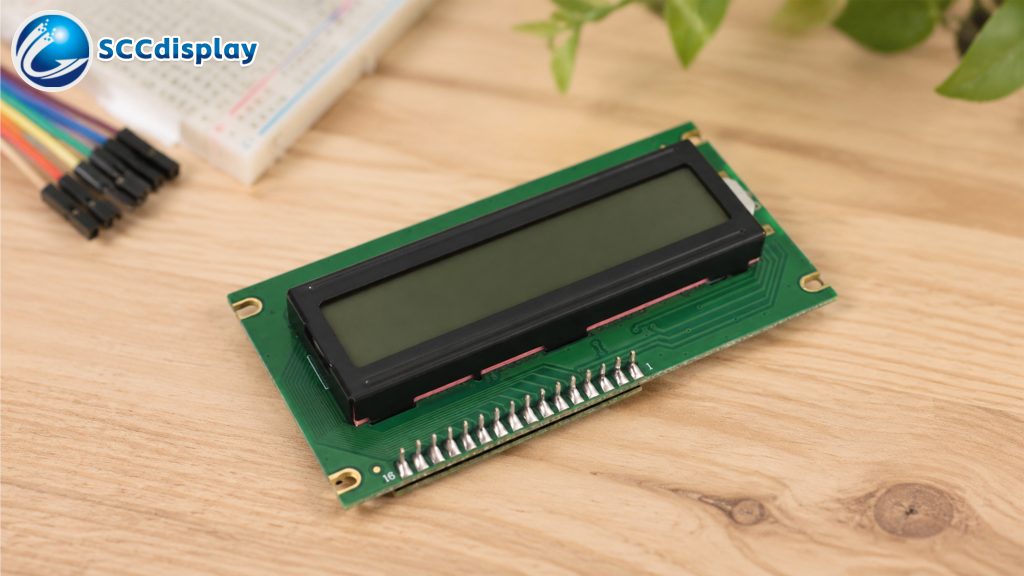
What Is an LCD Display Module?
液晶ディスプレイ (液晶ディスプレイ) module is an electronic display device that uses liquid crystal technology to show information. Unlike LEDs, LCDs do not emit light directly. Instead, they manipulate light to create visible characters or images.
LCD modules are popular because they are:
- 低消費電力
- Lightweight and compact
- Easy to interface with microcontrollers
- 費用対効果の高い
- Suitable for indoor and outdoor applications
Common LCD modules include:
- Character LCDs (16×2, 20×4)
- Graphic LCDs (128x64)
- TFT LCD displays
- OLED alternatives
Among these, character LCD modules are the most beginner-friendly and commonly used with development boards like Arduino.
Main Parts of an LCD Display Module
standard LCD module usually includes:
LCD Panel
The screen that displays characters or graphics.
コントローラIC
Controls the display operation. Popular controllers include HD44780 and ST7066.
バックライト
Provides illumination for visibility in low-light conditions.
Interface Pins
Used for power and communication with a microcontroller.
Typical pins include:
- VCC – Power supply
- GND – Ground
- RS – Register select
- RW – Read/write
- EN – Enable
- D0–D7 – Data pins
- LED+ / LED− – Backlight control
Types of LCD Display Modules
Character LCD Modules
Character LCDs display letters, 数字, and symbols in predefined grids such as:
- 16液晶×2
- 20x4 LCD
- 8液晶×2
These are ideal for:
- Sensor readings
- Menu systems
- Clocks
- Simple user interfaces
Graphic LCD Modules
Graphic LCDs can display custom images, アイコン, とグラフィック.
Popular resolutions include:
- 128x64
- 240x128
These are commonly used in industrial equipment and portable devices.
TFT LCD Modules
TFT LCDs provide full-color displays and higher resolutions. They are used in:
- Smart devices
- Automotive systems
- Medical equipment
- 家電
How LCD Modules Work
LCD modules work by controlling liquid crystal molecules between polarized layers. 電圧印加時, the crystals align differently, affecting how light passes through the display.
The controller chip converts incoming data into visible characters or graphics on the screen.
For character LCDs, 各文字は小さなピクセルのマトリックスを使用して形成されます, 通常は5x8ドット.
LCD ディスプレイモジュールの接続方法
正確な配線は LCD のタイプによって異なります, ただし、最も一般的なセットアップでは、Arduino ボードを備えた 16x2 キャラクター LCD を使用します。.
必要なコンポーネント
- LCDディスプレイモジュール
- Arduinoボード
- ブレッドボード
- ジャンパー線
- ポテンショメータ (コントラスト調整用)
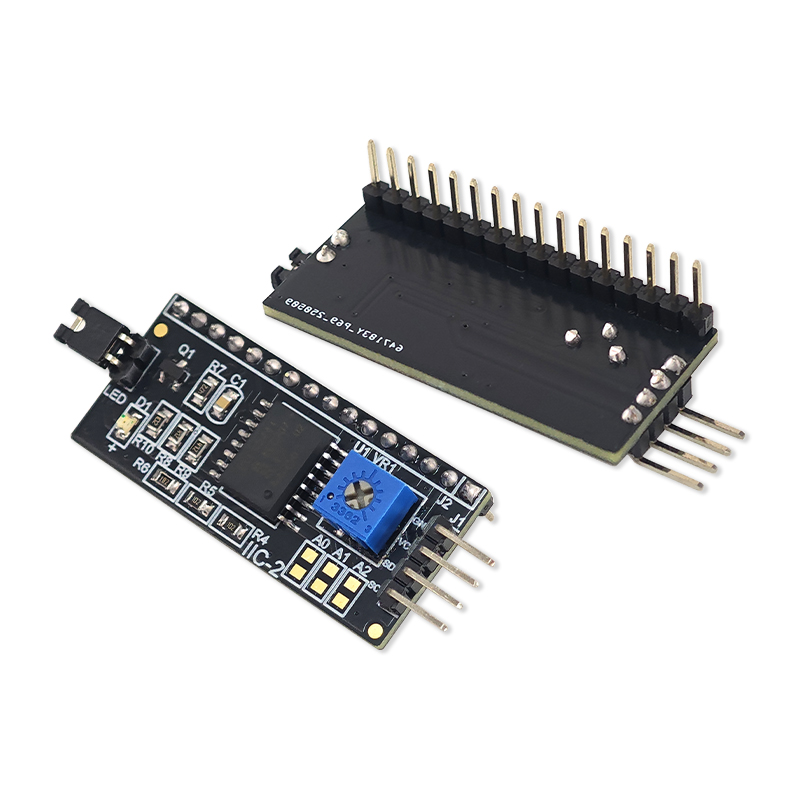
I2C LCD モジュールの使用
従来の LCD には多くの配線が必要. I2C LCD アダプタは、インターフェイスを 4 つのピンのみに減らすことで接続を簡素化します。:
- VCC
- GND
- SDA
- SCL
I2C LCDモジュールの利点:
- 配線が簡単に
- マイクロコントローラーのピンを節約
- よりクリーンなプロジェクト レイアウト
一般的な LCD ディスプレイ アプリケーション
LCDモジュールは数え切れないほどの電子製品に使用されています.
家電
- Clocks
- 電卓
- 家電製品
産業機器
- コントロールパネル
- 監視システム
- 自動化デバイス
医療機器
- 診断装置
- ポータブル機器
車載用ディスプレイ
- Dashboard indicators
- Motorcycle LCD displays
- Navigation systems
DIY Electronics Projects
- Arduino プロジェクト
- Raspberry Pi システム
- スマートホームコントローラー
Troubleshooting LCD Modules
Beginners often encounter issues when first using LCD displays.
Blank Screen
考えられる原因:
- 誤った配線
- Contrast not adjusted
- Power supply issue
Random Characters
考えられる原因:
- Loose connections
- Incorrect initialization
- Software errors
No Backlight
考えられる原因:
- Backlight pins not connected
- Damaged LED backlight
Display Not Responding
考えられる原因:
- Wrong pin configuration
- Faulty controller chip
- Incorrect I2C address
Carefully checking wiring and code usually resolves most problems.
Tips for Better LCD Performance
Adjust Contrast Properly
Use a potentiometer to improve text visibility.
Use I2C for Simpler Wiring
This reduces complexity and improves reliability.
Avoid Excessive Voltage
Most LCD modules operate at 5V or 3.3V. Applying higher voltage may damage the display.
Protect the Display
Avoid excessive pressure or moisture exposure.
Use Proper Libraries
Reliable libraries simplify programming and reduce compatibility issues.
Advantages of LCD Display Modules
LCD modules remain popular because they offer many benefits:
- Low power usage
- Long lifespan
- Good readability
- Compact size
- Affordable pricing
- Easy microcontroller integration
These features make them ideal for embedded systems and portable electronics.
Future of LCD Display Technology
LCD technology continues evolving with improvements in:
- Higher resolutions
- Better color reproduction
- 広い視野角
- 消費電力の低減
- Flexible display designs
Although OLED and other technologies are growing, LCD modules remain one of the most practical and widely used display solutions in the electronics industry.
結論
Learning how to use an LCD display module is an important step for anyone interested in electronics and embedded systems. From simple character LCDs to advanced TFT displays, LCD technology provides reliable visual output for countless applications.
By understanding the basics of wiring, programming, and troubleshooting, beginners can quickly create interactive projects and professional display systems. Whether you are building an Arduino sensor monitor, an industrial controller, or a consumer product, LCD display modules offer a dependable and cost-effective solution.
