






एलसीडी डिस्प्ले मॉड्यूल का उपयोग कैसे करें
LCD display modules are widely used in electronics projects, औद्योगिक उपकरण, स्मार्ट घरेलू उपकरण, चिकित्सा उपकरण, और एम्बेडेड सिस्टम. They provide a simple and efficient way to display text, नंबर, प्रतीक, and even graphics. Whether you are a beginner learning electronics or an engineer developing a product, understanding how to use an LCD display module is an essential skill.
This guide explains what an LCD display module is, how it works, the different types available, and how to connect and program one successfully.
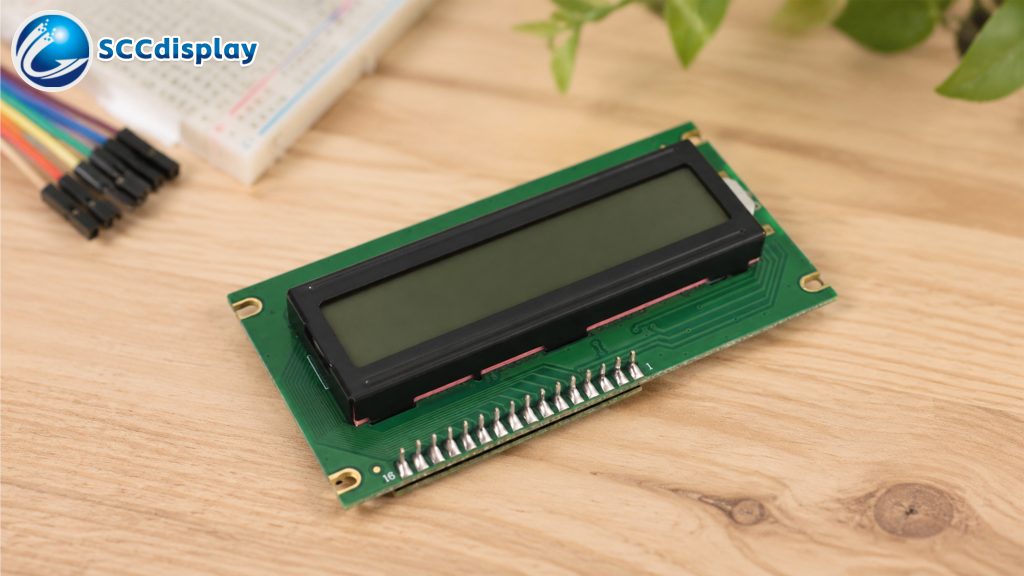
What Is an LCD Display Module?
एलसीडी (लिक्विड क्रिस्टल डिस्प्ले) module is an electronic display device that uses liquid crystal technology to show information. Unlike LEDs, LCDs do not emit light directly. Instead, they manipulate light to create visible characters or images.
LCD modules are popular because they are:
- कम बिजली की खपत
- Lightweight and compact
- Easy to interface with microcontrollers
- प्रभावी लागत
- Suitable for indoor and outdoor applications
Common LCD modules include:
- Character LCDs (16x2, 20x4)
- Graphic LCDs (12864)
- TFT LCD displays
- OLED alternatives
Among these, character LCD modules are the most beginner-friendly and commonly used with development boards like Arduino.
Main Parts of an LCD Display Module
standard LCD module usually includes:
एलसीडी पैनल
The screen that displays characters or graphics.
नियंत्रक आईसी
Controls the display operation. Popular controllers include HD44780 and ST7066.
बैकलाइट
Provides illumination for visibility in low-light conditions.
Interface Pins
Used for power and communication with a microcontroller.
Typical pins include:
- VCC – Power supply
- GND – Ground
- RS – Register select
- RW – Read/write
- EN – Enable
- D0–D7 – Data pins
- LED+ / LED− – Backlight control
एलसीडी डिस्प्ले मॉड्यूल के प्रकार
कैरेक्टर एलसीडी मॉड्यूल
Character LCDs display letters, नंबर, and symbols in predefined grids such as:
- 16x2 एलसीडी
- 20x4 एलसीडी
- 8x2 एलसीडी
These are ideal for:
- Sensor readings
- Menu systems
- Clocks
- Simple user interfaces
ग्राफिक एलसीडी मॉड्यूल
Graphic LCDs can display custom images, माउस, और ग्राफिक्स.
लोकप्रिय संकल्पों में शामिल हैं:
- 12864
- 240x128
These are commonly used in industrial equipment and portable devices.
टीएफटी एलसीडी मॉड्यूल
TFT LCDs provide full-color displays and higher resolutions. They are used in:
- Smart devices
- Automotive systems
- चिकित्सकीय संसाधन
- उपभोक्ता इलेक्ट्रॉनिक्स
How LCD Modules Work
LCD modules work by controlling liquid crystal molecules between polarized layers. When voltage is applied, the crystals align differently, affecting how light passes through the display.
The controller chip converts incoming data into visible characters or graphics on the screen.
For character LCDs, each character is formed using a small matrix of pixels, usually 5x8 dots.
How To Connect an LCD Display Module
The exact wiring depends on the LCD type, लेकिन सबसे आम सेटअप Arduino बोर्ड के साथ 16x2 कैरेक्टर एलसीडी का उपयोग करता है.
आवश्यक घटक
- एलसीडी डिस्प्ले मॉड्यूल
- अरुडिनो बोर्ड
- ब्रेडबोर्ड
- जम्पर तार
- तनाव नापने का यंत्र (कंट्रास्ट समायोजन के लिए)
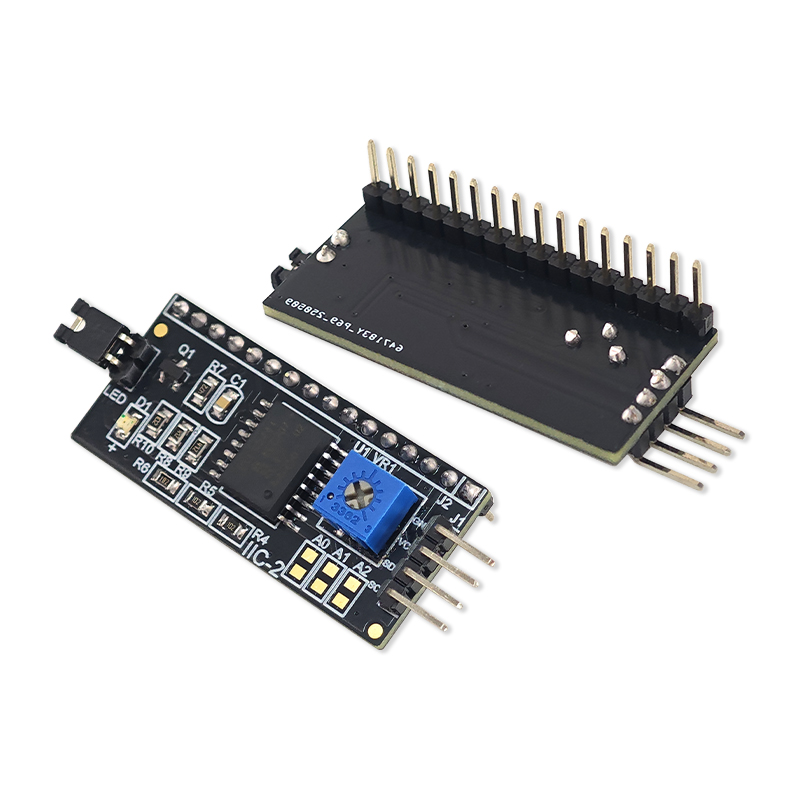
I2C एलसीडी मॉड्यूल का उपयोग करना
पारंपरिक एलसीडी को कई तारों की आवश्यकता होती है. I2C LCD एडाप्टर इंटरफ़ेस को केवल चार पिन तक कम करके कनेक्शन को सरल बनाते हैं:
- वी.सी.सी
- जी.एन.डी
- एसडीए
- आयोग
I2C एलसीडी मॉड्यूल के लाभ:
- आसान वायरिंग
- माइक्रोकंट्रोलर पिन बचाता है
- क्लीनर प्रोजेक्ट लेआउट
सामान्य एलसीडी डिस्प्ले अनुप्रयोग
अनगिनत इलेक्ट्रॉनिक उत्पादों में एलसीडी मॉड्यूल का उपयोग किया जाता है.
उपभोक्ता इलेक्ट्रॉनिक्स
- Clocks
- कैलकुलेटर
- घरेलू उपकरण
औद्योगिक उपकरण
- नियंत्रण पैनल
- निगरानी प्रणाली
- स्वचालन उपकरण
चिकित्सा उपकरण
- निदान उपकरण
- पोर्टेबल उपकरण
ऑटोमोटिव डिस्प्ले
- डैशबोर्ड संकेतक
- मोटरसाइकिल एलसीडी डिस्प्ले
- नेविगेशन सिस्टम
DIY इलेक्ट्रॉनिक्स परियोजनाएं
- अरडुइनो प्रोजेक्ट्स
- रास्पबेरी पाई सिस्टम
- स्मार्ट होम नियंत्रक
एलसीडी मॉड्यूल का समस्या निवारण
पहली बार एलसीडी डिस्प्ले का उपयोग करते समय शुरुआती लोगों को अक्सर समस्याओं का सामना करना पड़ता है.
खाली स्क्रीन
संभावित कारण:
- ग़लत वायरिंग
- Contrast not adjusted
- Power supply issue
Random Characters
संभावित कारण:
- Loose connections
- Incorrect initialization
- Software errors
No Backlight
संभावित कारण:
- Backlight pins not connected
- Damaged LED backlight
Display Not Responding
संभावित कारण:
- Wrong pin configuration
- Faulty controller chip
- Incorrect I2C address
Carefully checking wiring and code usually resolves most problems.
Tips for Better LCD Performance
Adjust Contrast Properly
Use a potentiometer to improve text visibility.
Use I2C for Simpler Wiring
This reduces complexity and improves reliability.
Avoid Excessive Voltage
Most LCD modules operate at 5V or 3.3V. Applying higher voltage may damage the display.
Protect the Display
Avoid excessive pressure or moisture exposure.
Use Proper Libraries
Reliable libraries simplify programming and reduce compatibility issues.
एलसीडी डिस्प्ले मॉड्यूल के लाभ
LCD modules remain popular because they offer many benefits:
- Low power usage
- Long lifespan
- Good readability
- Compact size
- Affordable pricing
- Easy microcontroller integration
These features make them ideal for embedded systems and portable electronics.
Future of LCD Display Technology
LCD technology continues evolving with improvements in:
- Higher resolutions
- Better color reproduction
- व्यापक देखने के कोण
- Lower power consumption
- Flexible display designs
Although OLED and other technologies are growing, LCD modules remain one of the most practical and widely used display solutions in the electronics industry.
निष्कर्ष
Learning how to use an LCD display module is an important step for anyone interested in electronics and embedded systems. From simple character LCDs to advanced TFT displays, LCD technology provides reliable visual output for countless applications.
By understanding the basics of wiring, programming, and troubleshooting, beginners can quickly create interactive projects and professional display systems. Whether you are building an Arduino sensor monitor, an industrial controller, or a consumer product, LCD display modules offer a dependable and cost-effective solution.
